
Core ProtectGUI Mod (26.3, 26.1.2) – Catch Server Griefers and Restore
 0
0
 0
0

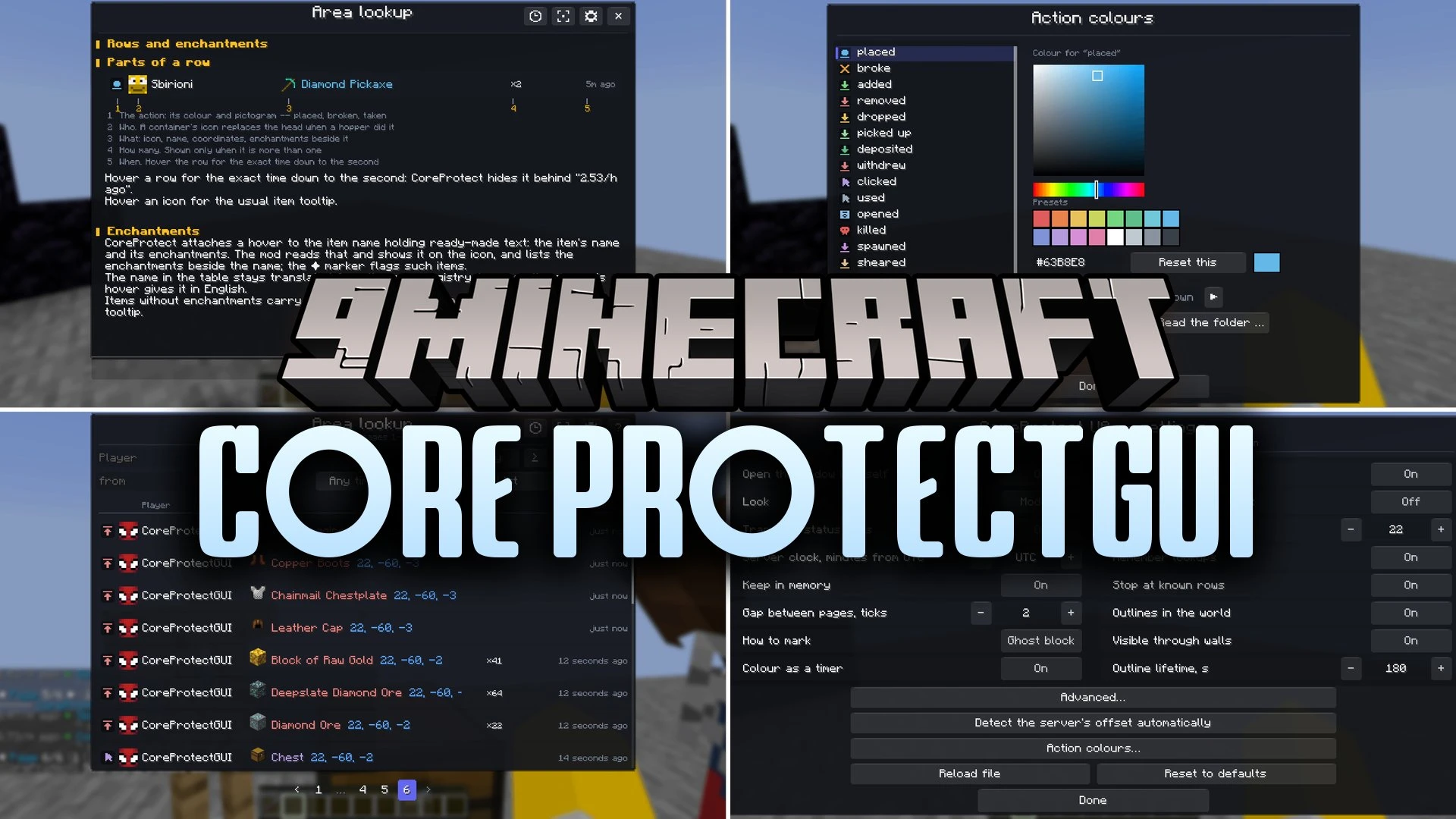
Core ProtectGUI Mod extends CoreProtect with an interactive graphical window for server inspections. Instead of filling your chat with hundreds of text lines, this mod shows logged events inside a clear, sortable table. You see real player heads, item textures, and readable timestamps like actual minutes ago rather than raw decimal numbers. It works completely on the client side, so you can inspect containers and track griefers without adding files to the server. The mod also turns complex chat commands into simple clickable forms.
Features:
- Visual Inspection Table: Shows CoreProtect logs in a window with player heads, item icons, and color-coded actions.
- Smart Command Forms: Replaces typed lookup and rollback lines with clickable form windows.
- Instant Summary View: Groups hundreds of log lines into single totals by player, item, or action.
- Client-Side Operation: Runs straight from your own client without needing server-side mod installation.
- Error Prevention: Checks command rules before sending and stops invalid lookups before they fail.
- Multi-Page Merging: Combines multiple log pages into one continuous table for simple sorting.
- Replaces decimal time stamps with natural phrases showing hours and minutes.
- Lets you sort any column with a single click and reverse the order with a second click.
- Includes quick presets for time periods like the last hour, day, week, or exact timestamps.
- Displays container icons for hoppers and dispensers so you see what moved items.
- Translates block and item names directly into your active game language.
- Shows the full assembled command at the bottom of the screen before sending it to chat.
Filter Syntax:
- Type a minus before a player name like
-Steveto show everyone except that player. - Separate names with commas like
Steve,Alexto match either person. - Wrap item names in quotation marks like
"oak_log"for exact matches. - Use greater-than symbols like
>64to search for counts above a single stack.
How to Use:
- Connect to a server running CoreProtect.
- Inspect a block or container using your standard inspector command.
- Open the table interface to browse through the logged events.
- Click any column header to sort entries by player, item, action, or date.
- Type filter criteria into the search box to isolate specific players or items.
- Switch to summary mode to review total items taken or placed.
Screenshots:


How to Install:
New to Minecraft? Follow our step-by-step guide to install Mods on your PC.View Guide
Requirements:





Core ProtectGUI Mod Download Links
For Minecraft 26.3
For Minecraft 26.2
For Minecraft 26.1.2, 26.1.1, 26.1
Click to rate this post!
[Total: 0 Average: 0]
You May Also Like
Picked for this page
 Player Finder Mod (26.1.2, 1.20.1) – Command To Locate Players
 Mindful Darkness Mod (26.3, 1.20.1) – Turning Minecraft into Dark Mode
 DarkSleep Mod (26.3, 1.20.1) – Dynamic Night Skipping With DarkSleep
 Pepsi’s Early Elytra Mod (26.2, 1.21.1) – Your Wings, Your Way
 The Fletching Table Mod (26.3, 1.20.1) – Transform Your Arrows With Ease
 Horror Messages Mod (1.21.8, 1.20.1) – Random Horror Messages
 Luma Light Mod (26.3, 1.20.1) – Give Your World Vibrant Colors
 Swift Vault Flow Mod (26.3, 1.20.1) – Sort and Restock Your Base Storage
 Tetrismc Mod (26.3, 1.21.1) – Play a Falling Block Minigame Right
 Item Stat Tracker Mod (26.2, 1.21.1) – Track Every Mob Slain and Block Mined
 Aero Rush Audio Mod (26.3, 1.20.1) – Hear the Wind Rush Past As You Soar
 SWG Simple Waystones Groups Mod (26.3, 1.21.1) – Organize Fast Travel
Most viewed in Mods over the last 7 days
 Ala Industrial Mod (26.3) – Run Electric Power Grids and Automated Factories
 PleasureCraft Mod (26.3, 1.21.1) – Jenny Mod Remake for Fabric
 Jennycraft Mod (26.3, 1.20.1) – Virtual Girlfriend in Minecraft
 Fapcraft Mod (26.3, 1.12.2) – Comprehensive and Detailed Content
 Jenny Mod (Fapcraft) Official Complete Guide – How to use, Tutorial
 BangCraft Mod (1.20.1) – Jenny, Ellie and Elliot
 The Shooting Star Demo Mod (26.3, 1.20.1) – Vaporize Terrain From Orbit
 Baritone 9minecraft Client Mod (26.3, 26.1.2) – Mine and Build Bases Hands-Free
 SchnurriTV Mod (1.12.2) – Characters and Features
 OptiFine HD (26.3, 1.20.1) – Run Faster, FPS Boost, Shaders Support
 GeckoLib Mod (26.3, 1.20.1) – Powerful Animation and Rendering Engine
 Meteor Client Mod (26.2, 1.20.1) – Xray, HUD, Fly
More from Mods
 Music and Melody Mod (26.3, 1.21.1) – Create Custom Music Playlists
 Aerial Hell Mod (26.3, 1.20.1) – New Floating Dimension
 CB: Compressed Blocks Mod (26.3, 1.20.1) – Store Billions of Blocks!
 Navigator Mod (1.7.10) – Sync Waypoints and Markers Across All Your Maps
 Sapling Mod (26.2, 1.20.1) – Watch Mobs Change Their Outfits
 Big Reactors 9minecraft Mod (26.3, 26.2) – Build Massive Nuclear Power Plants
 Bosses of Mass Destruction 9minecraft Mod (26.3) – Challenge and Conquer Deadly Bosses
 Blue Skies 9minecraft Mod (26.3, 26.2) – Conquer Two Massive New Dimensions
 Better Music Toast Mod (26.3, 1.20.1) – Enjoy Nonstop Music While Exploring
 Cobblemon Cards Mod (1.21.1) – Unlock Passive Buffs with Graded Cards
 Extended Beacon Range Mod (26.3, 1.21.1) – Never Lose Your Beacon Buffs
 Q Command Mod (26.3, 1.20.1) – Trigger Server Teleports with One Click

This post has no comments yet. Be the first — your comment will appear here.