
Dietary Statistics Mod (1.19.4, 1.18.2) – Feast Beyond Normal Hunger Limits
 313
 0


Dietary Statistics Mod raises your maximum food and saturation limits so you can eat twice as much as normal. It adds a new Food Max attribute that sets your default food capacity to 40 instead of the usual 20. When your food level goes above 20, the mod shows a custom food bar with colors you can change in its config file.

Features:
- Food Max Attribute: Adds a new attribute that controls how much food and saturation you can hold, raising the default limit to 40 (twice the vanilla capacity).
- Custom Food Bar Rendering: Uses custom rendering to display your food bar whenever your food level goes above 20.
- Lets you change the colors of the extended food bar.
- Includes a config file inside the .minecraft/config folder so you can edit the settings.
- Does not work together with the Gluttony mod.
How to Use:
- Open the .minecraft/config folder on your computer and find the config file for this mod.
- Edit the config file to change the food bar colors and other settings.
- Play the game and keep eating past the normal 20 food limit; your food bar fills up to 40 by default and shows the custom display above 20.
Screenshots:
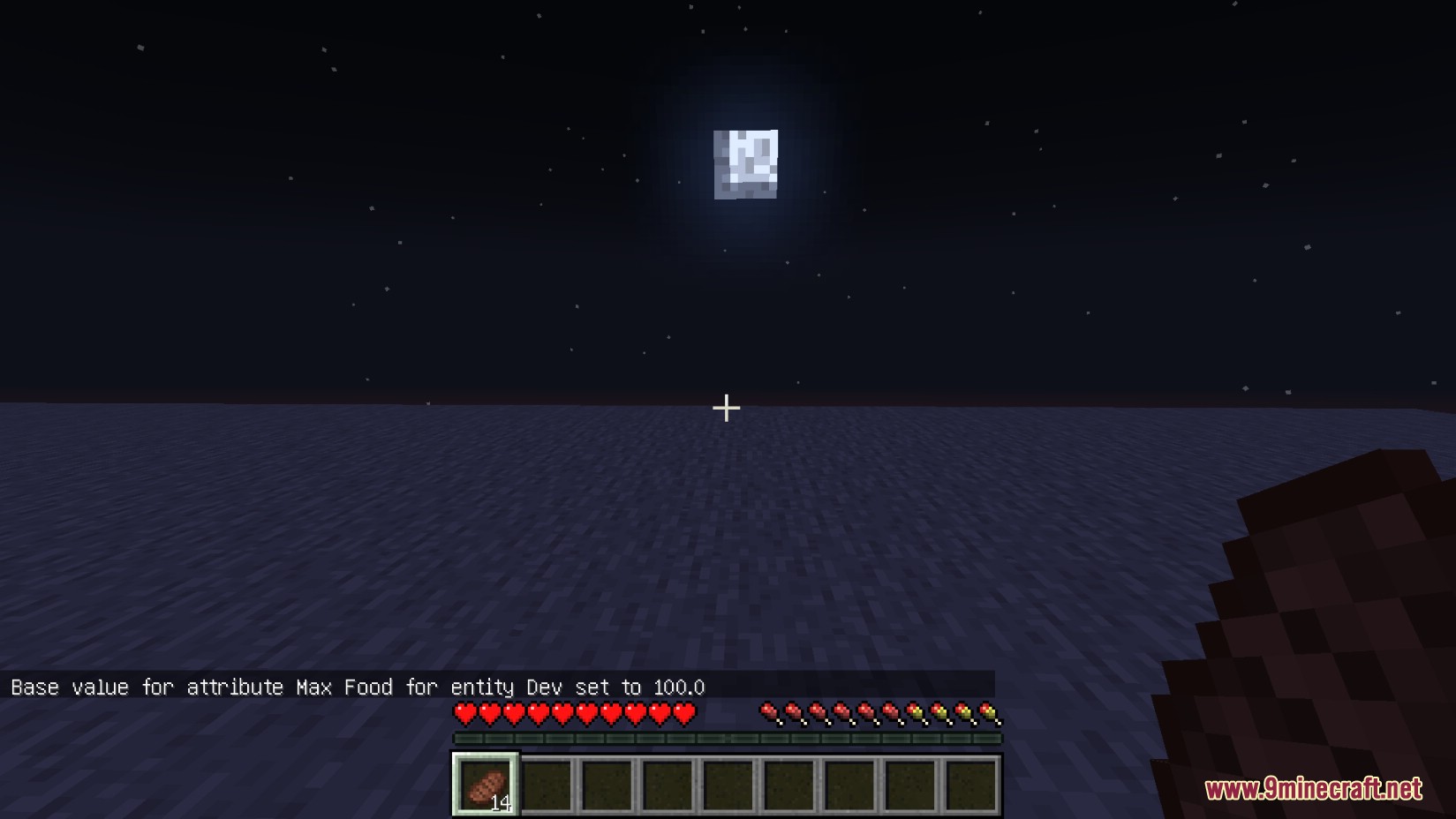
Max Food Rendered
How to Install:
New to Minecraft? Follow our step-by-step guide to install Mods on your PC.View Guide
Dietary Statistics Mod Download Links
For Minecraft 1.19.4
Forge version: Download from Server 1 – Download from Server 2
For Minecraft 1.19.2
Forge version: Download from Server 1 – Download from Server 2
For Minecraft 1.18.2
Forge version: Download from Server 1 – Download from Server 2
Have you ever used connector mods (like Sinytra Connector) to run Fabric mods on Forge/NeoForge?
21 responses · See the full results →
You May Also Like
Picked for this page
 Patched Mod (26.2, 1.20.1) – Tools for Modifying Parts of JSON Files
 Model Gap Fix Mod (1.21.11, 1.20.1) – Fixing Graphics Bug
 Smart Brain Lib Mod (26.3, 1.20.1) – Mobs That Think and React
 ViaFabricPlus Mod (26.3, 1.20.1) – Connect to Every Server Version
 Physical Falling Trees Mod (26.2, 1.21.11) – Realistic Tree-falling Mechanics
 Better Command Block UI Mod (26.3, 1.20.1) – Improved Multi-line
 Trade Uses Mod (26.1.2, 1.20.1) – Find the best trades
 In-Game NBTEdit Reborn Mod (1.21.11, 1.20.1) – GUI to Edit NBT of Entities
 Player Particles Mod (26.2, 1.21.1) – Make Players Emit Particles
 Respawning Shulkers Mod (26.3, 1.20.1) – Shulkers Respawn Infinitely
 Durability Guard Mod (26.3, 1.20.1) – Prevents Weapons From Breaking Unexpectedly
 Arch-RPGMana Mod (1.20.1, 1.20) – Mana System For Spell Engine Spells
Most viewed in Mods over the last 7 days
 Ala Industrial Mod (26.3) – Run Electric Power Grids and Automated Factories
 PleasureCraft Mod (26.3, 1.21.1) – Jenny Mod Remake for Fabric
 Jennycraft Mod (26.3, 1.20.1) – Virtual Girlfriend in Minecraft
 Fapcraft Mod (26.3, 1.12.2) – Comprehensive and Detailed Content
 Jenny Mod (Fapcraft) Official Complete Guide – How to use, Tutorial
 BangCraft Mod (1.20.1) – Jenny, Ellie and Elliot
 Fabric Loader (26.3, 1.20.1) – Fabric Installer for All Minecraft Versions
 The Shooting Star Demo Mod (26.3, 1.20.1) – Vaporize Terrain From Orbit
 Meteor Client Mod (26.3, 1.20.1) – Xray, HUD, Fly
 OptiFine HD (26.3, 1.20.1) – Run Faster, FPS Boost, Shaders Support
 Aristois Client Mod (1.21.4, 1.20.1) – World Class Minecraft Utility
 Prestige Client Mod (1.21.11, 1.21.4) – Powerful Ghost Features for Crystal & Sword PvP
More from Mods
 TheHouse Mod (1.21.11) – Host Casino Tables and Track Every Bet in Real Time
 CinematicInteractions Mod (1.21.1) – Watch Your Hands Work at Every Crafting Table
 Earth Platform Mod (1.21.1) – Travel Across Real Continents in a True Scale World
 Taunahi Mod (26.1.2) – Automate Daily Farming and Slayers in Hypixel Skyblock
 HORROR Fake Join Leave Messages Mod (1.20.1) – Trigger Creepy Chat Scares
 Bons Voyage Mod (1.20.1) – Teleport Across Biomes Through Hidden Waystones
 Orbital Railgun UPDATED Mod (26.3) – Flatten Giant Landscapes From Space
 Automobility Autoradio Mod (26.3, 26.1.2) – Trade Custom Mixtapes with Friends
 Towers of the Wild 9minecraft Mod (26.3, 26.2) – Climb Tall Towers for Loot
 Ender Storage 9minecraft Mod (26.3, 26.2) – Send Loot Back Home From Any Dimension
 Snad 9minecraft Mod (26.3, 26.2) – Build Faster Sugar Cane and Nether Wart Farms
 Together Forever Unofficial Mod (1.12.2) – Share Team Advancements

This post has no comments yet. Be the first — your comment will appear here.