
Effects Left Mod (1.19.2, 1.18.2) – Keep Potion Icons Off Your Recipe Lists
 4
 0

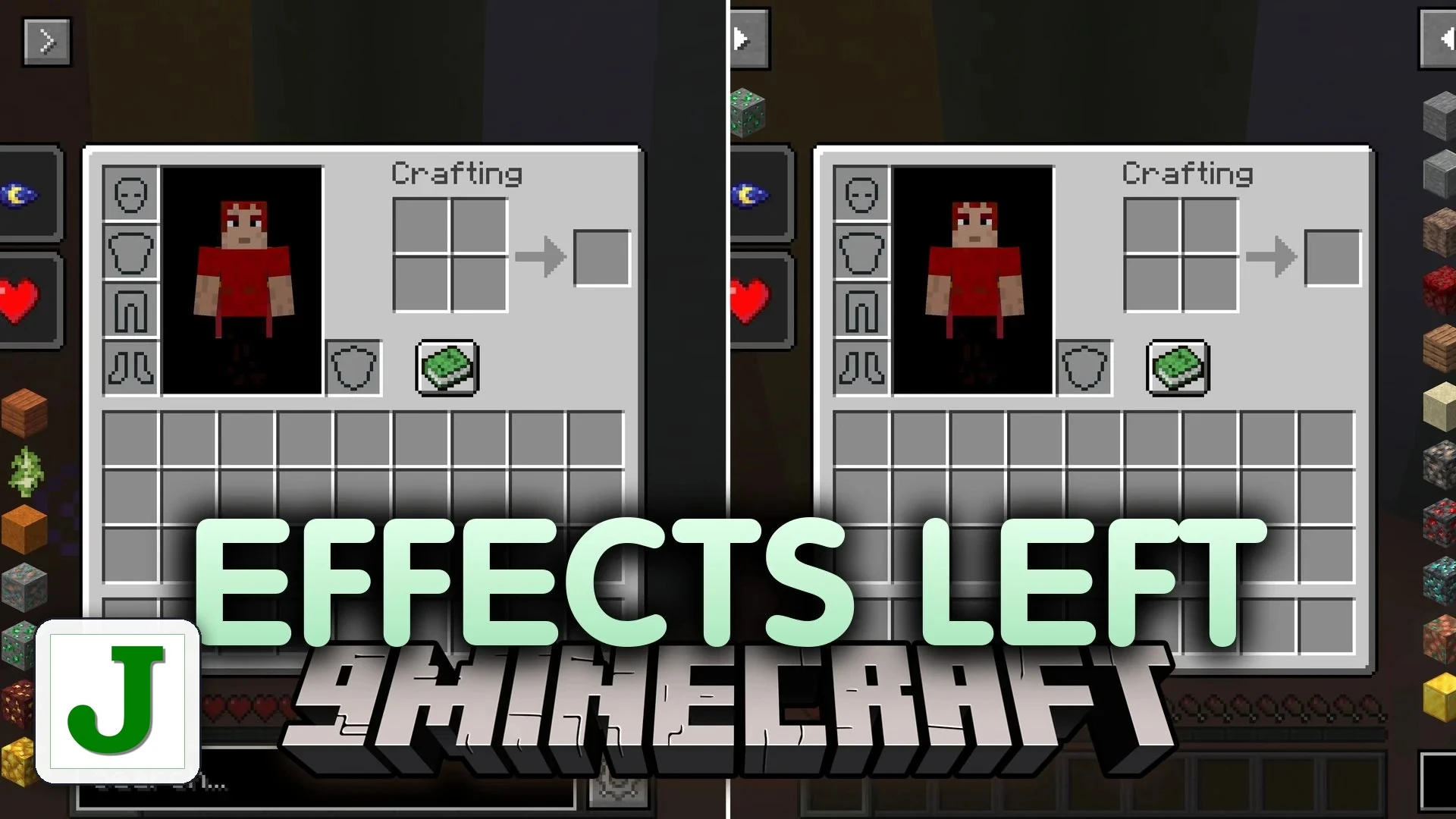
Effects Left Mod moves your active potion effects in the inventory screen back to the left side instead of the right. This returns the display layout to how it looked before Minecraft 1.18. By shifting the icons over, the mod stops potion effects from getting in the way of recipe viewers like Just Enough Items (JEI) and Roughly Enough Items (REI). It runs completely on the client side, so you can use it on any multiplayer server without needing the server to install it.
Features:
- Left-Side Effect Display: Uses Mixin to shift active potion effect icons from the right side of the inventory screen back to the left side.
- JEI and REI Compatibility: Adjusts the exclusion zones for both JEI and REI so potion icons and item lists do not overlap.
- Removes the empty gap on the right side of the screen where potion effects normally sit in JEI and REI.
- Adds proper spacing on the left side when you have favorited items in JEI or when your REI panel is set to the left, including adjustments for small effect icons.
- Adds the 1.18 small effect icon texture to the built-in Programmer Art Resource Pack so classic textures display properly.
- Runs entirely on the client side, which means it works on any multiplayer server and does nothing if placed in a server mod folder.
- Includes a built-in update checker to notify you when a new version is available.
Screenshots:


How to Install:
New to Minecraft? Follow our step-by-step guide to install Mods on your PC.View Guide
Requirements:

Effects Left Mod Download Links
For Minecraft 1.19.2
For Minecraft 1.18.2, 1.18.1
Click to rate this post!
[Total: 0 Average: 0]
You May Also Like
Picked for this page
 Neat Mod (26.2, 1.20.1) – Track Mob Health in Combat
 Presence Footsteps Mod (26.3, 1.20.1) – Authentic Soundscapes on Every Surface
 Bag of Holding Mod (26.3, 1.20.1) – Carry Entire Dungeons in Your Pocket
 BetterShields Mod (26.3, 1.20.1) – Color Cues for Blocking
 FlightAssistant Mod (1.21.11, 1.20.1) – Fly Safely with Automated Airplane
 Carpet Minitweaks Mod (1.21.11, 1.20.1) – Extension for Carpet Mod
 Safe Anchor Mod (1.21.11) – Instantly Charge Anchors During Crystal PvP
 Smelt All Stone Blocks in Blast Furnaces Mod (26.2, 1.20.1)
 Razuuu’s Advanced HUD Mod (1.21.11, 1.20.1) – Track Game Performance
 Create Automotives Mod (26.1.2, 1.20.1) – Drive Steam Powered Vehicles
 Pack Core Mod (26.2, 1.21.11) – Set Up Your SkyBlock Modpacks
 Soulwarden RPG Series Plus Mod (1.21.11, 1.21.1) – Weaponize the Souls
Most viewed in Mods over the last 7 days
 Ala Industrial Mod (26.3) – Run Electric Power Grids and Automated Factories
 PleasureCraft Mod (26.3, 1.21.1) – Jenny Mod Remake for Fabric
 Jennycraft Mod (26.3, 1.20.1) – Virtual Girlfriend in Minecraft
 Fapcraft Mod (26.3, 1.12.2) – Comprehensive and Detailed Content
 Meteor Client Mod (26.3, 1.20.1) – Xray, HUD, Fly
 Jenny Mod (Fapcraft) Official Complete Guide – How to use, Tutorial
 OptiFine HD (26.3, 1.20.1) – Run Faster, FPS Boost, Shaders Support
 BangCraft Mod (1.20.1) – Jenny, Ellie and Elliot
 Fabric Loader (26.3, 1.20.1) – Fabric Installer for All Minecraft Versions
 CatLean Client Mod (26.2, 1.21.11) – ThunderHack Recode Alternatives
 Patched Mod (26.3, 1.20.1) – Edit Game Files Without Breaking Packs
 Baritone Client Mod (26.3, 1.20.1) – Autominer, Build with AI, Xray
More from Mods
 Architecture Craft TridentMC Version Mod (1.12.2) – Build Sloped Roofs
 SCP RP Sever Pack by Doverack Mod (1.20.1) – Host Multiplayer SCP Facility
 IE Conveyor Refinements Mod (1.21.1, 1.20.1) – Stop Accidental Item Pickups
 Behind You Mod (1.21.1) – Never Get Caught Off Guard By Sneaking Monsters Again
 Better Party X HUD Styles Mod (26.3, 1.20.1) – Customize Your Multiplayer Party
 Biomes O Plenty Chipped Mod (1.21.1) – Carve Modded Woods Into Custom Building
 Chewy Cheeses Mod (1.21.1, 1.20.1) – Ferment and Age Exotic Cheeses
 Create Loconautics Mod (1.21.1) – Drive Realistic Physics Trains That Can Crash
 Create Aeronautics Placeable Wheels Mod (1.21.1) – Decorate Garages
 Decorative Blocks Reborn Mod (26.3, 1.21.1) – Detail Medieval Castles
 Blood & Guts Mod (1.19.2) – Add Bleeding Effects for a Darker Horror World
 Create Odds ‘N Ends Mod (1.21.1) – Carve Furniture, Weave Art

This post has no comments yet. Be the first — your comment will appear here.