
Summoning Rituals Mod (1.21.1, 1.20.1) – Conjure Mobs Through Dark Rites
 4,644
 0


Summoning Rituals Mod lets you create custom summoning rituals in Minecraft for items, mobs, and commands. This mod comes with no default recipes, giving modpacks full control to design their own ritual systems. It includes native KubeJS integration for building recipes, along with support for custom events, block patterns, and renderers. Each ritual runs on an Altar block where you add input items, keep nearby sacrifice mobs in range, and insert a catalyst item last to start the craft. The Altar also connects with hoppers and item pipes for smooth automation, and recipes appear through JEI and REI integration.

Features:
- Custom Summoning Rituals: Lets you build custom recipes that summon items, spawn mobs, or run commands from the Altar block.
- Native KubeJS Support: Connects directly with KubeJS to add new recipes easily, with options for custom events, block patterns, and renderers.
- Full Automation: Works with hoppers and all kinds of item pipes to feed items into the Altar automatically.
- Includes no default recipes, giving modpacks complete control over every ritual in the world.
- Supports JEI and REI integration so players can view required items and mobs right in the recipe screen.
Ritual Mechanics:
- Catalyst: Acts as the final item inserted into the Altar to start a ritual. Every recipe needs one Catalyst, and the Altar takes only a single item even if you hold a whole stack. If any ritual condition fails, the Catalyst pops back out.
- Inputs: Uses items placed inside the Altar that are consumed once the ritual finishes.
- Sacrifices: Uses nearby mobs as part of a recipe since mobs cannot be placed inside the Altar block.
- Sacrifice Region: Defines the area around the Altar where sacrifice mobs must stand to be consumed. The default setting is 3, 2, 3, which creates a 5x3x5 area centered on the Altar.
- Outputs: Splits ritual rewards into item outputs and mob outputs with NBT support, allowing spawned mobs to have custom values such as extra health.
- Offset: Shifts where outputs spawn relative to the Altar using X, Y, and Z coordinates. Outputs spawn directly above the Altar by default, while an offset like 3, 2, -5 moves them 3 blocks on X, 2 blocks on Y, and -5 blocks on Z.
- Spread: Controls how outputs scatter randomly around their spawn point after the offset. Mobs spawn individually, while item outputs group into stacks of up to 4 items. The default spread is 1, 0, 1 for slight horizontal scattering.
How to Use:
- Add custom ritual recipes using KubeJS first, since this mod has no default recipes on its own.
- Place the Altar block in the world and connect hoppers or item pipes if you want to automate item input.
- Put all required input items inside the Altar block so the ritual can consume them.
- Bring any required sacrifice mobs into the recipe’s Sacrifice Region around the Altar (5x3x5 centered on the Altar by default).
- Insert the Catalyst item last to start the ritual; the Altar takes only one item at a time and pops it out if any condition fails.
- Wait for the ritual to finish and consume the inputs and sacrifices to get your custom items, spawned mobs, or command results above the Altar or at the recipe’s offset position.
Screenshots:
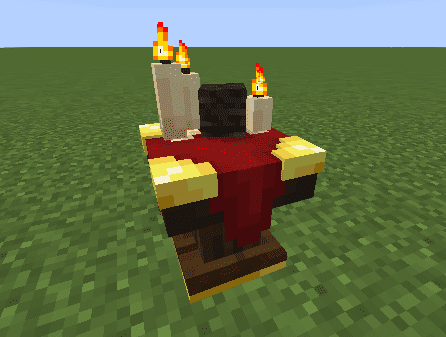
Altar
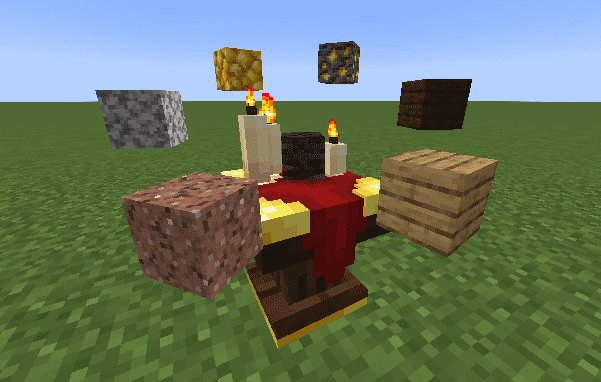
Altar with Items
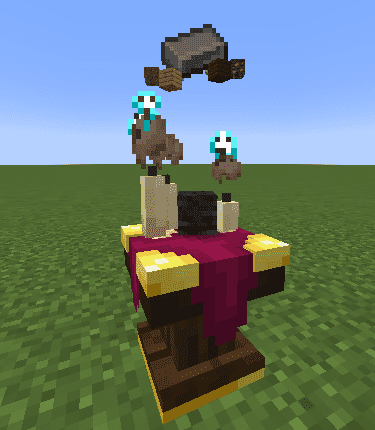
Altar while Crafting
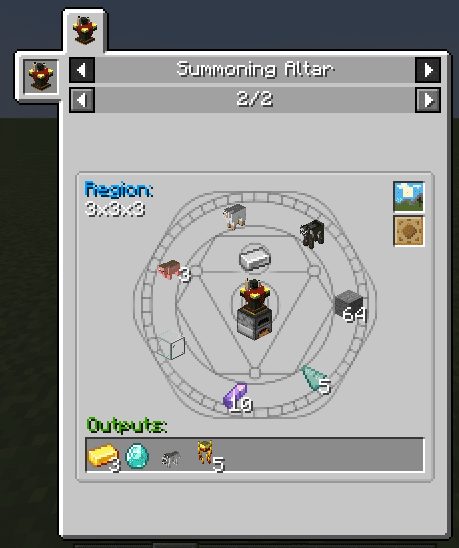
JEI / REI Integration
How to Install:
New to Minecraft? Follow our step-by-step guide to install Mods on your PC.View Guide
Summoning Rituals Mod Download Links
For Minecraft 1.21.1, 1.21
NeoForge version: Download from Server 1 – Download from Server 2
For Minecraft 1.20.1, 1.20
Forge version: Download from Server 1 –
For Minecraft 1.19.2
Forge version: Download from Server 1 – Download from Server 2
Fabric version: Download from Server 1 – Download from Server 2
For Minecraft 1.18.2
Forge version: Download from Server 1 – Download from Server 2
You May Also Like
Picked for this page
 Real Camera Mod (26.3, 1.20.1) – Improved First Person View
 Ledger Mod (26.3, 1.20.1) – Powerful, Server-Side Logging Mod
 Soul Fire’d Mod (26.1.2, 1.20.1) – Consistent Soul Fire Damage
 Inventory Interactions Mod (26.3, 1.20.1) – Right Click Repairs And More
 Tacz Presence Mod (1.20.1) – Survive the Chaos Of Incoming Fire In Tense
 Smart Back Packs Mod (26.2, 1.20.1) – Never Run Out of Space on Long Mining
 Velocity Forge Refined Mod (26.3, 26.1.2) – Build Custom Cars and Drift
 Server Cosmetics Mod (26.2, 1.20.1) – Server Side Cosmetics
 Starch Scorch Blaze Mod (1.21.1, 1.20.1) – Fight Spreading Wildfires
 Vessel Stitcher Synthesis Mod (1.20.1) – Hijack Defeated Sorcerers
 World Start Commands and Global Gamerules Mod (26.1.2, 1.20.1) – Run Commands On World Creation
 Star Carefree Game Mod (1.20.1, 1.19.2) – Banner For Players To Create Their Own Servers
Most viewed in Mods over the last 7 days
 Ala Industrial Mod (26.3) – Run Electric Power Grids and Automated Factories
 PleasureCraft Mod (26.3, 1.21.1) – Jenny Mod Remake for Fabric
 Jennycraft Mod (26.3, 1.20.1) – Virtual Girlfriend in Minecraft
 Fapcraft Mod (26.3, 1.12.2) – Comprehensive and Detailed Content
 Jenny Mod (Fapcraft) Official Complete Guide – How to use, Tutorial
 BangCraft Mod (1.20.1) – Jenny, Ellie and Elliot
 Fabric Loader (26.3, 1.20.1) – Fabric Installer for All Minecraft Versions
 The Shooting Star Demo Mod (26.3, 1.20.1) – Vaporize Terrain From Orbit
 Meteor Client Mod (26.3, 1.20.1) – Xray, HUD, Fly
 OptiFine HD (26.3, 1.20.1) – Run Faster, FPS Boost, Shaders Support
 Aristois Client Mod (1.21.4, 1.20.1) – World Class Minecraft Utility
 Prestige Client Mod (1.21.11, 1.21.4) – Powerful Ghost Features for Crystal & Sword PvP
More from Mods
 Avali Nexus Mod (26.3) – Settle Frozen Frontiers with High-Tech Bird Tribes
 Orient’s Hotpot Chronicles Mod (1.20.1) – Boil Fresh Hotpot Meals Over Open Flames
 Far Lands Traveler Mod (26.1.2) – Survive the Long Trek to the Edge of the World
 Beli’s SkyLyrics Mod (1.21.11) – Sing Along to Desktop Tracks Projected in the Night Sky
 Explainstone and Songmelyn Mod (1.21.1) – Broadcast Custom Music Across Your Base
 Rockstar Shaders Mod (26.3) – Cast Ray-Traced Light Across Vast Distant Horizons
 ERYDON Mod (1.20.1) – Design Grand Courtyards with Carved Marble Pillars
 Infinity Bound Mod (1.21.1) – Snap Away Enemies with Legendary Superhero Gear
 Legacy Gecko Lib Fabric Mod (1.16.5) – Power Animated Creatures in Modpacks
 The Man from the Shadow Horror Mod (1.20.1) – Fight Hallucinations to Survive
 Shade & Saturation Slider Mod (26.2, 1.21.11) – Make Every Biome Vibrant
 Cataclysm X Yung’s Better Nether Fortresses Compat Mod (1.21.1, 1.20.1)

This post has no comments yet. Be the first — your comment will appear here.