
Blackstone Stash Schematic (1.21.x) – Rich End Game Blackstone Storage Room

 0


Blackstone Stash Schematic gives you a small, rich storage area for your world. It offers a great place to keep your best late-game items safe.
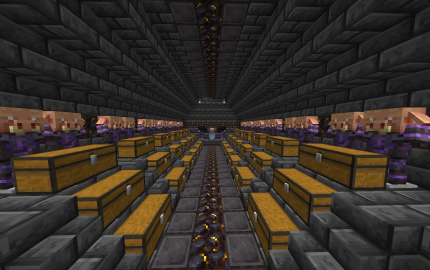
3D Preview & Editor:
Materials
8 types · 1,313 blocks
| Deepslate Bricks | 607 | Grass Block | 325 | Gilded Blackstone | 106 | |||
| Dirt | 95 | Netherite Block | 76 | Chest | 72 | |||
| Deepslate Brick Stairs | 28 | Lantern | 4 | |||||
How to place this schematic
.litematic This is a Litematica schematic. You place it with the Litematica mod, which shows the build as a ghost overlay you fill in.
| 1 | Install Litematica (plus MaLiLib) for your Minecraft version. |
| 2 | Put the .litematic file in .minecraft/schematics. |
| 3 | In game press M → Load Schematics, pick the file, then Load. |
| 4 | Position the ghost preview, then build it by hand — or turn on Easy Place to place blocks straight from your hotbar. |
Features:
- Adds a dark stash room that fits well in the Nether or underground bases.
- Holds rare items like elytras, piglin heads, and dragon heads.
- Uses gilded blackstone blocks to give the walls a shiny, golden look.
- Takes up a small 15 by 12 by 28 block space, making it easy to place anywhere.
- Needs exactly 1,313 blocks to build completely without any extra mods.
Schematic Specs:
 Minecraft1.21.x
 Dimensions15×12×28
 Total Blocks1,313
 Top Blocks Used
Deepslate Bricks 607Grass Block 325Gilded Blackstone 106Dirt 95Netherite Block 76
Blackstone Stash Schematic Download Links
For Minecraft 1.21.x
Click to rate this post!
[Total: 0 Average: 0]
You May Also Like
Picked for this page
 Fastest Bonemeal Farm Donut Smp Schematic (1.21.x) – Fast Redstone Bonemeal Farm Build
 Fastest Kelp Farm Donut Smp Schematic (1.21.x) – Compact Redstone Kelp Farm Design
 Best Tp Trap on Donut Smp Schematic (1.21.x) – Clever Redstone Trap For Multiplayer Servers
 Bamboss V2 800k Bamboo per Hour Schematic (1.21.x) – High Speed Automated Bamboo Farm Schematic
 1.07M Kelp Farm Donut Smp Basicredstone V2 Schematic (1.21.x) – Massive Automated Kelp Farm Build
 Fast and Efficient Bonemeal Farm Donut SMP Schematic (1.21.x) – Compact Redstone Bonemeal Generator Buil
 Damocless Code Geass Schematic (1.21.x) – Floating City Build From Code Geass
 Mossinator V2 72k Bonemeal per Hour Schematic (1.21.x) – Massive Moss Farm For Endless Bonemeal
 Twenture Emerald Spawner Farm Schematic (1.21.x) – Double Vindicator Spawner Emerald Farm Layout
 Kanye West Graduation Bear Schematic (1.21.x) – Classic Album Mascot Pixel Art Build
 Pokémon Aréna 4G Nacrene City Unova Schematic (1.21.x) – Nacrene City Museum Arena Vanilla Build
 Santos FC Schematic (1.21.x) – Santos Futebol Clube Pixel Art Build
Most viewed in Schematics over the last 7 days
- Fastest Bonemeal Farm Donut Smp Schematic (1.21.x) – Fast Redstone Bonemeal Farm Build
 64 Module Cobblestone Farm Schematic (1.21.x) – Massive Automated Stone Gathering Build
 KelpFarmV9.9 Schematic (1.21.x) – Compact And Simple Seaweed Farm Build
 Villager Trading Hall Schematic (1.21.x) – Modern Shop Build For 48 Villagers
 Gold Farm Schematic (1.21.x) – Automatic Nether Roof Gold Farm
- Bamboss V2 800k Bamboo per Hour Schematic (1.21.x) – High Speed Automated Bamboo Farm Schematic
 Bamboo Farm Schematic (1.21.x) – Small Automated Redstone Bamboo Farm
 Best Railgun Tp Trap on Donutsmp Schematic (1.21.x) – Unescapable Multiplayer Redstone Trap Build
 Minutes End Base Before Spoke Null End Video Schematic (1.21.x) – Giant Unstable SMP End Base Schema
 Cobble Farm 50m per Hour Donut SMP Schematic – High Yield Cobblestone Generator Build
 Donut Smp Stash and Regear Schematic (1.21.x) – Large Storage And Regear Room Build
 36 Module Cobble Farm 18m per Hour Donut SMP Schematic (1.21.x) – Massive Automated Stone Generator
More from Schematics
 Medieval Garden Manor Schematic (1.21.x) – Elegant Medieval Manor With Teal Roofs
 Modern Purple Apartment Schematic (1.20.x) – Stylish Urban Living With Vibrant Purple Design
 Modern Green Apartment Schematic (1.20.x) – Stylish Urban Living for Modern Cities
 Cozy Family House Schematic (1.20.x) – Warm Suburban Home for Your Minecraft World
 Medieval Clock Tower Schematic (1.21.x) – Tall Stone Tower with Teal Spire
 Minecraft Wearing Silence Statue Free Schem Schematic (1.19.x) – Giant Silence Armor Statue for Mine
 Medieval House 2 Schematic (1.21.x) – Classic Medieval Home for Custom Decoration
 Medieval Autumn Lakehouse Schematic (1.21.x) – Cozy Medieval House with Autumn Trees
 Creaking Statue Minecraft Build Schematic (1.21.x) – Spooky Statue for Horror and Fantasy Worlds
 Medieval Portal Keep Schematic (1.21.x) – Strong Medieval Castle With Nether Portal
 Sugar Cane Farm V1 Schematic (1.21.x) – Large Scale Automatic Sugar Cane Farm
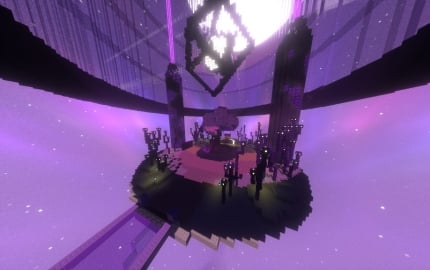 End Spawn Schematic (1.21.x) – Clean Minimalist End Themed Server Spawn Hub

This post has no comments yet. Be the first — your comment will appear here.