
FOER Fish OnMC Extras R Mod (26.3, 1.21.11) – Custom HUDs and Fishing Stats
 0
 0

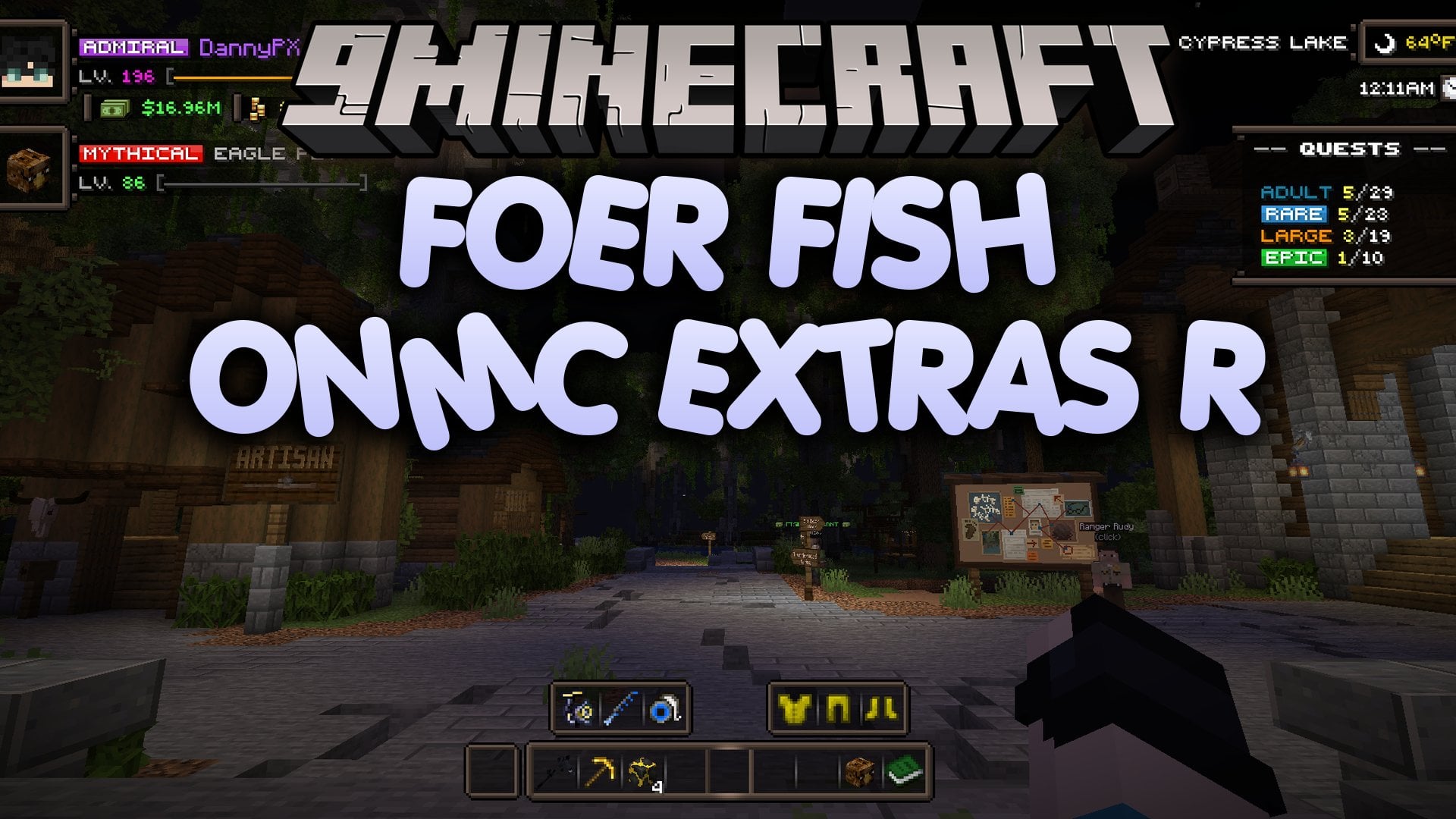
FOER Fish OnMC Extras R Mod adds quality-of-life tools and custom interface options for players on the play.fishonmc.net server. It tracks statistics for fish, pets, and all other items while adding visual details like a 3D bait model and a light source on your fishing bobber. Players can build custom HUDs, buttons, timers, and chat triggers to organize their screen and track server activities. This mod runs on Fabric and requires Fzzy Config to work.
Features:
- Statistics Tracking: Tracks stats for fish, pets, and all other items in a dedicated statistics panel, and lets you import existing stats.
- Custom Creators: Includes tools to build your own custom HUDs, buttons, chat triggers, timers, and notifications, plus placeholders to pull live data into text fields.
- Fishing Bobber Upgrades: Renders a 3D bait model below your fishing bobber and adds a light source directly to the bobber.
- Search Bars & Market Info: Adds search bars inside
/ah,/pv, and chests, and shows the price per item in the auction house. - Provides pre-made HUD elements for your hotbar, location, pet, profile, and active quests.
- Includes a new notifier system for fish catches and custom alerts.
- Displays pet percentages and shows the currently equipped item on your pets.
- Marks item rarity and adds tooltip hover details.
- Displays armor rolls and roll costs directly on the armor tooltip and the roll screen.
- Shows a tacklebox lock icon on the bait slot.
- Adds a toggle to hide your armor.
- Places small buttons inside your inventory for quick access to the Config Screen and Button Creator.
- Marks crew chat messages, shows notifications when crew members join or leave, and pins crew members to the top of the tab list.
How to Use:
- Join the
play.fishonmc.netserver with the mod installed. - Press O at any time to open the configuration screen directly, or click the small shortcut buttons inside your inventory to open the Config Screen and Button Creator.
- Drag and move the HUD elements on the HUD Screen to change their position on your display.
- Type inside the search bars when viewing
/ah,/pv, or chests to filter your items quickly.
How to Install:
New to Minecraft? Follow our step-by-step guide to install Mods on your PC.View Guide
Requirements:

FOER Fish OnMC Extras R Mod Download Links
For Minecraft 26.3
For Minecraft 26.2
For Minecraft 26.1.2, 26.1.1, 26.1
For Minecraft 1.21.11
Click to rate this post!
[Total: 0 Average: 0]
You May Also Like
Picked for this page
 CleanCut Mod (26.3, 1.20.1) – Fight Mobs Through Tall Grass
 Server Pack Unlocker Mod (26.3, 1.20.1) – Use Custom Textures Everywhere
 Item Transform Helper Mod (26.3, 1.20.1) – Position and Scale Custom Items
 Memory Sweep Mod (26.3, 1.20.1) – Keep Your Long Sessions Lag Free
 Antigravity Mod (26.3, 1.21.1) – Fall Upwards and Float Away
 Disable Accessibility Screen Mod (26.3, 1.20.1) – Skip Startup Screens
 Ynotnaexists’s Netherite Elytra Mod (1.21.11, 1.21.5) – Lava-Proof And Knockback Resistant
 V-Paxel’s Mod (26.3, 1.21.1) – Carry One Tool for Every Job
 Structure Finder Mod (26.3, 1.20.1) – Track Down Hidden Dungeons
 DecorationX Christmas Mod (26.3, 1.21.1) – Decorate Your Home and Fight Snowman
 Create Synthetic Pressure Mod (26.3, 1.21.1) – Press Graphite Into Diamonds
 GoopReforged Mod (1.20.1) – Leave Colorful Slime Splatters Across Every Surface
Most viewed in Mods over the last 7 days
 Ala Industrial Mod (26.3) – Run Electric Power Grids and Automated Factories
 PleasureCraft Mod (26.3, 1.21.1) – Jenny Mod Remake for Fabric
 Jennycraft Mod (26.3, 1.20.1) – Virtual Girlfriend in Minecraft
 Fapcraft Mod (26.3, 1.12.2) – Comprehensive and Detailed Content
 Jenny Mod (Fapcraft) Official Complete Guide – How to use, Tutorial
 Meteor Client Mod (26.3, 1.20.1) – Xray, HUD, Fly
 BangCraft Mod (1.20.1) – Jenny, Ellie and Elliot
 OptiFine HD (26.3, 1.20.1) – Run Faster, FPS Boost, Shaders Support
 Fabric Loader (26.3, 1.20.1) – Fabric Installer for All Minecraft Versions
 SeedCrackerX Mod (26.3, 1.20.1) – Find Any World Seed
 CatLean Client Mod (26.2, 1.21.11) – ThunderHack Recode Alternatives
 SchnurriTV Mod (1.12.2) – Characters and Features
More from Mods
 Cosmonautics Planetary Expansion Mod (1.21.1) – Survive Deadly Alien Worlds
 Void’s Throwing Disc Mod (26.3) – Fight Mobs From Afar with Enchanted Ranged
 Player Use Counter Mod (26.3, 1.21.11) – Track Enemy Totems and Golden Apples
 Visual Inputs Mod (26.3, 1.21.1) – Perfect Your PvP Timing with Tick-Based
 Create TransFE Mod (1.21.1) – Connect Forge Energy Machines to Your Electrical
 Decibel Mod (26.3, 1.21.1) – Mute Annoying Noises and Control Every Single Game
 Create Power Grid Magnetic Reactors Mod (1.21.1) – Power Factories & Fly
 Holiday Cosmetics Mod (26.3, 1.21.11) – Collect Seasonal Hats By Playing
 Mouse Button Toggle Mod (26.3, 1.21.1) – Mine and Build Without Holding
 Cascade Mod (26.3, 1.21.1) – Render Smooth Particle Effects
 Let’s Do Foundation Mod (1.21.1) – Core Library Powering the Let’s Do Mod Series
 Nub-lib Mod (1.21.11, 1.21.1) – Core Library Powering Shared Mod Settings

This post has no comments yet. Be the first — your comment will appear here.